asks:
reading:
Paul Baran, On Distributed Communications: I. Introduction to Distributed Communications Networks (1964). This essay is one of the foundational documents of the internet, and network theory that led to its development. It’s part of On Distributed Communications series from the Rand corporation if you’d like to read more on it.David Isenberg on Stupid Networks (1998). This describes the difference between single-owner, circuit-switched networks and modern distributed, packet-switched networks. It helped communications industry professionals understand the digital networks that were emerging at that time.
doing:
Use traceroute to explore the paths of your network transactions (here’s an additional introduction to traceroute). Try to get a sense of where the routers and servers on which you rely are physically located, and what networks they traverse. (try Visual Traceroute too).Start by tracing a few of the sites that you visit regularly: Facebook, gmail, bank, school, Zoom, etc. Trace your last few online purchases or meetings. Alternately, download your browsing history from Google (if you use Chrome) from takeout.google.com. You’re not recording the activities, you’re collecting data about the paths over which those activities occurred, after the fact.
Trace the paths from all of the locations you regularly connect from: home, school, any public places from which you connect. You can even trace from and to your mobile phone, if you know its IP address. Save the traces in files, and make maps of the routes.
See if you can figure out where your most common sites are using IP geolocation. Use a site like ipinfo.io to make a list of where those IPs are located. Make a map of your results. How accurate do you think this map is, geographically? You might try a few different geoIP solutions to find where each IP address is located, and see how the results differ:
Use the various command line tools we cover to extract the ten or twenty domains you visit the most.
Review your traceroute data to see what common hosts and autonomous systems (AS) your traffic goes through. You can look up AS registrants on ARIN.net or any of the other Regional Internet Registries (RIRs).
Using the various Autonomous Systems you found, summarize the most common network providers in your activities. Identify who the major network providers are in your life, particularly those that your school, work, or home ISP get their services from. Figure out whose hands the data about your life goes through on a regular basis. Look for patterns from your network-browsing habits through analysis and graphing of your network traces.
A few useful tools:
Maxmind
IP2Location
IPdata.co
WhatismyIP.com
IPstack.com
Feel free to obfuscate the endpoints if you don’t want us to know what sites you visit. Write a summary of your work and findings on your blog. We’ll compare notes on each others traces in class.
commands from previous class:
ping — is a host alive and can I contact it?
nslookup — what’s this host’s name?
whois — who owns this host?
traceroute — how do I get to this host?
arp — address resolution protocol: what MAC address is linked to what IP address?
curl icanhazip.com — quick lookup of the public address of your network
GeoIP: iplocation.io and others.
what’s annoying for me about traceroute is that it just doesn’t work for most domains & network paths:
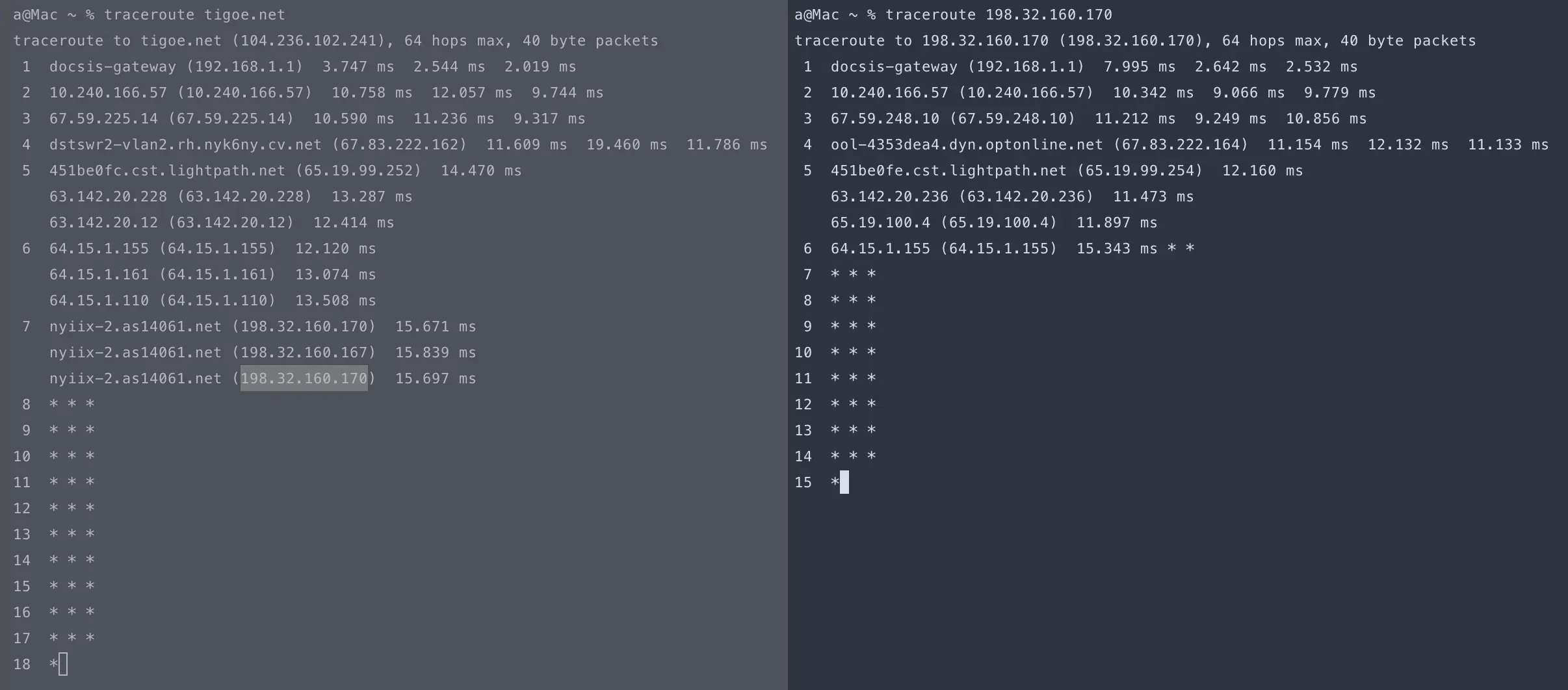
although -Iatleast gets a response back:
a@Mac ~ % traceroute -a -I tigoe.net
traceroute to tigoe.net (104.236.102.241), 64 hops max, 48 byte packets
 1  [AS0] docsis-gateway (192.168.1.1)  4.476 ms  2.934 ms  2.452 ms
 2  [AS0] 10.240.166.57 (10.240.166.57)  9.542 ms  13.096 ms  8.915 ms
 3  [AS0] 67.59.225.14 (67.59.225.14)  11.259 ms  14.999 ms  9.896 ms
 4  [AS6128] ool-4353dea0.dyn.optonline.net (67.83.222.160)  12.729 ms  11.402 ms  11.870 ms
 5  [AS6128] 63.142.20.12 (63.142.20.12)  13.564 ms  19.478 ms  27.724 ms
 6  [AS0] 64.15.1.161 (64.15.1.161)  55.790 ms  32.580 ms  49.315 ms
 7  [AS13538] nyiix-2.as14061.net (198.32.160.167)  20.392 ms  15.523 ms  13.524 ms
 8  * * *
 9  * * *
10  * * *
11  [AS0] 104.236.102.241 (104.236.102.241)  19.162 ms  13.465 ms  20.782 ms
what’s weird is how my traffic goes from as-0 → as6128 → as-0 → as13538 → as0. i wonder why the routing even goes outside as0 since we’re both a part of the same system.
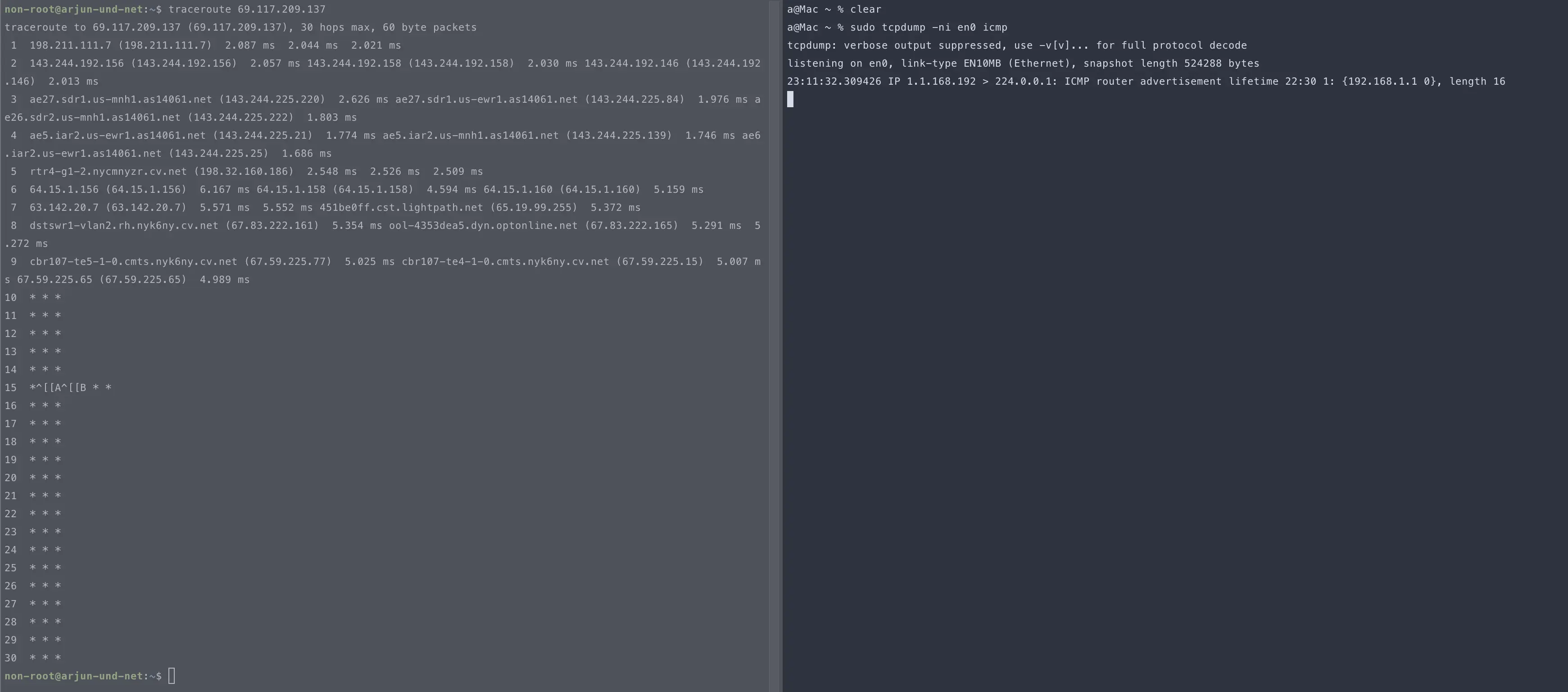
ping transmit and receive demo:
path from computer → droplet:

path from droplet → computer:
i exported both traceroutes into a txt, and then got an llm to write me a program that runs a check with http://ip-api.com/json/<ip> to get geolocation of the ip. this is the query with the parameters:
url = f"http://ip-api.com/json/{ip}?fields=status,message,city,regionName,country,isp,lat,lon"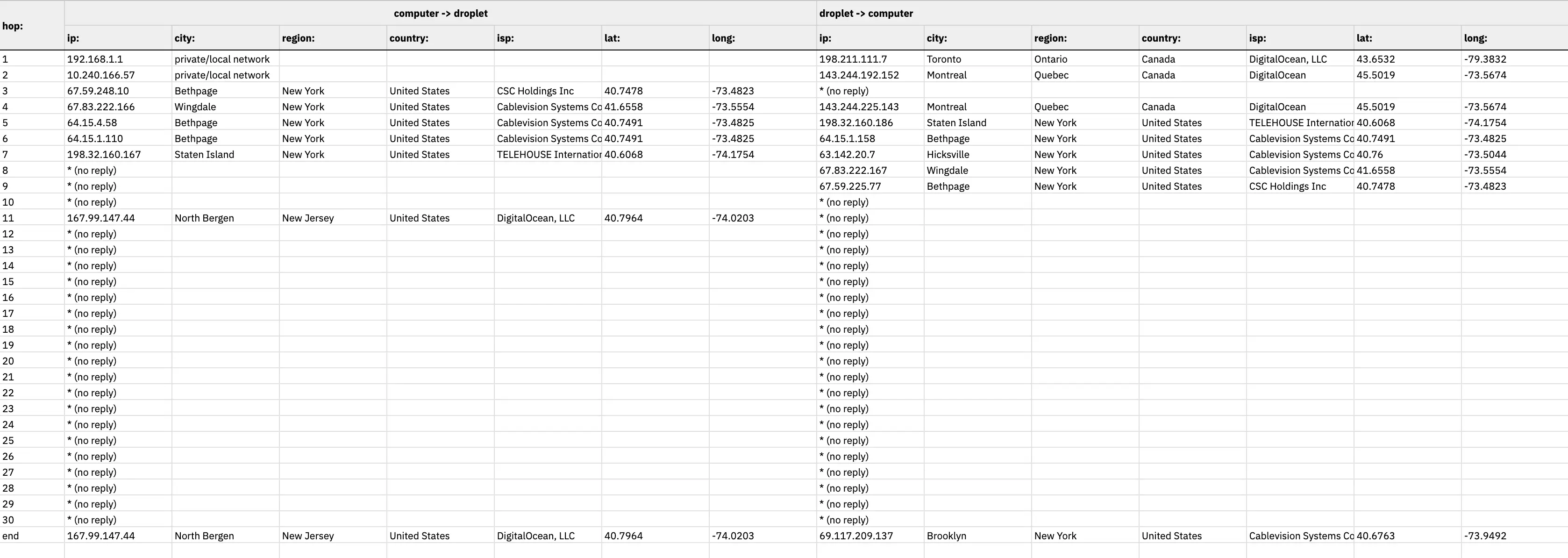 netflix.com blocks all traceroute things.
this is my high-school in india:
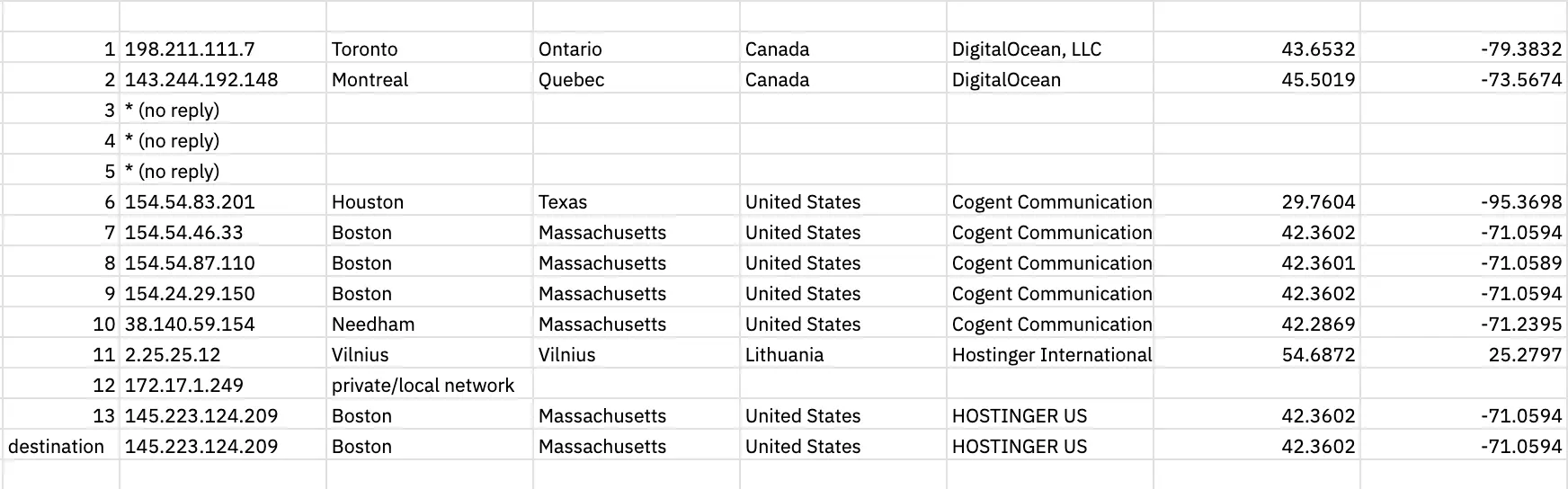
since they bought their domain from hostinger, i believe hostinger stores a copy of their site on their servers here in the us (even though the domain is .in). i want to find a webserver that is in india.
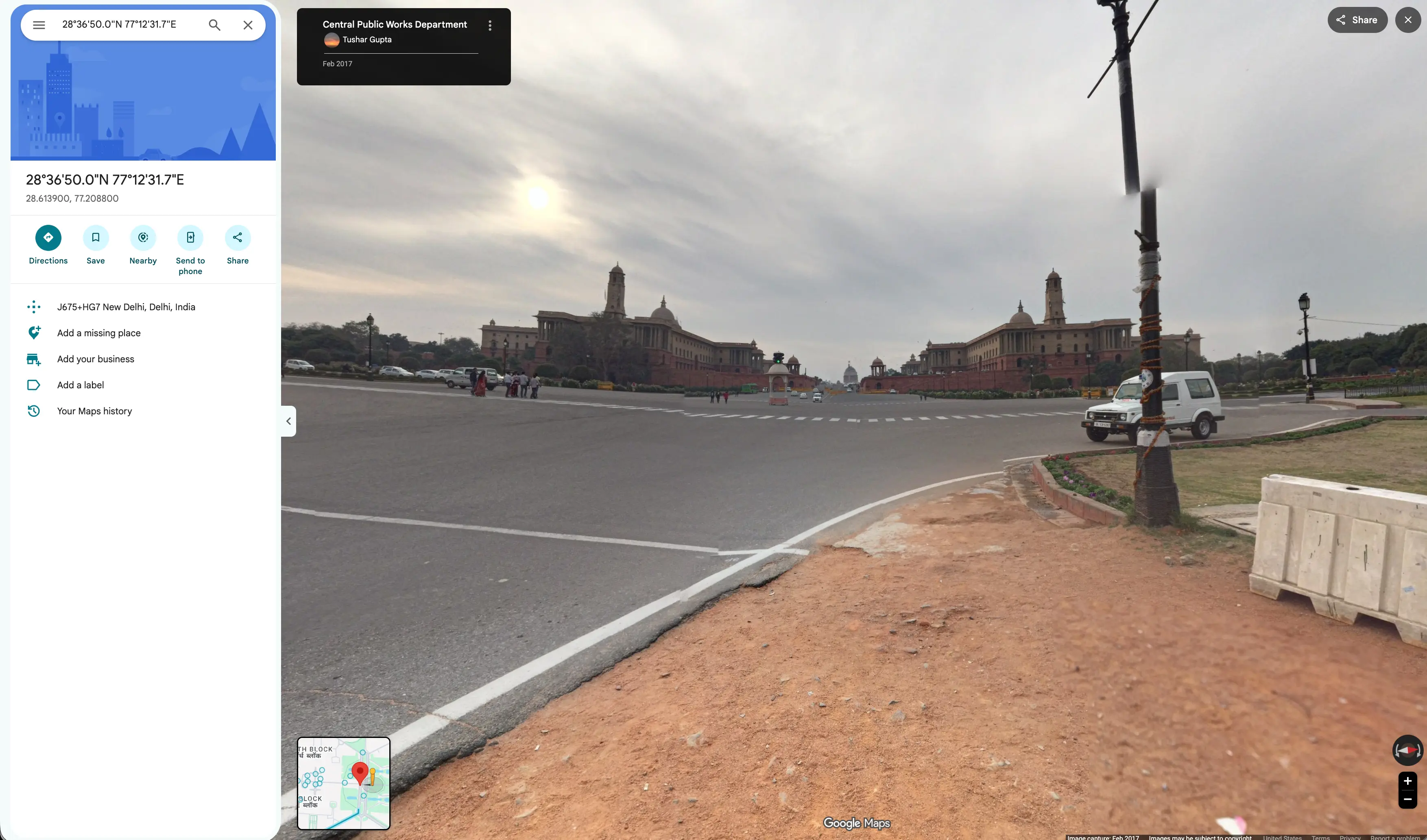
i then pinged the national investigation agency in india, and got to know that there is a whole separate internet service provider for them called national knowledge network. and i also got their longitude & latitude.
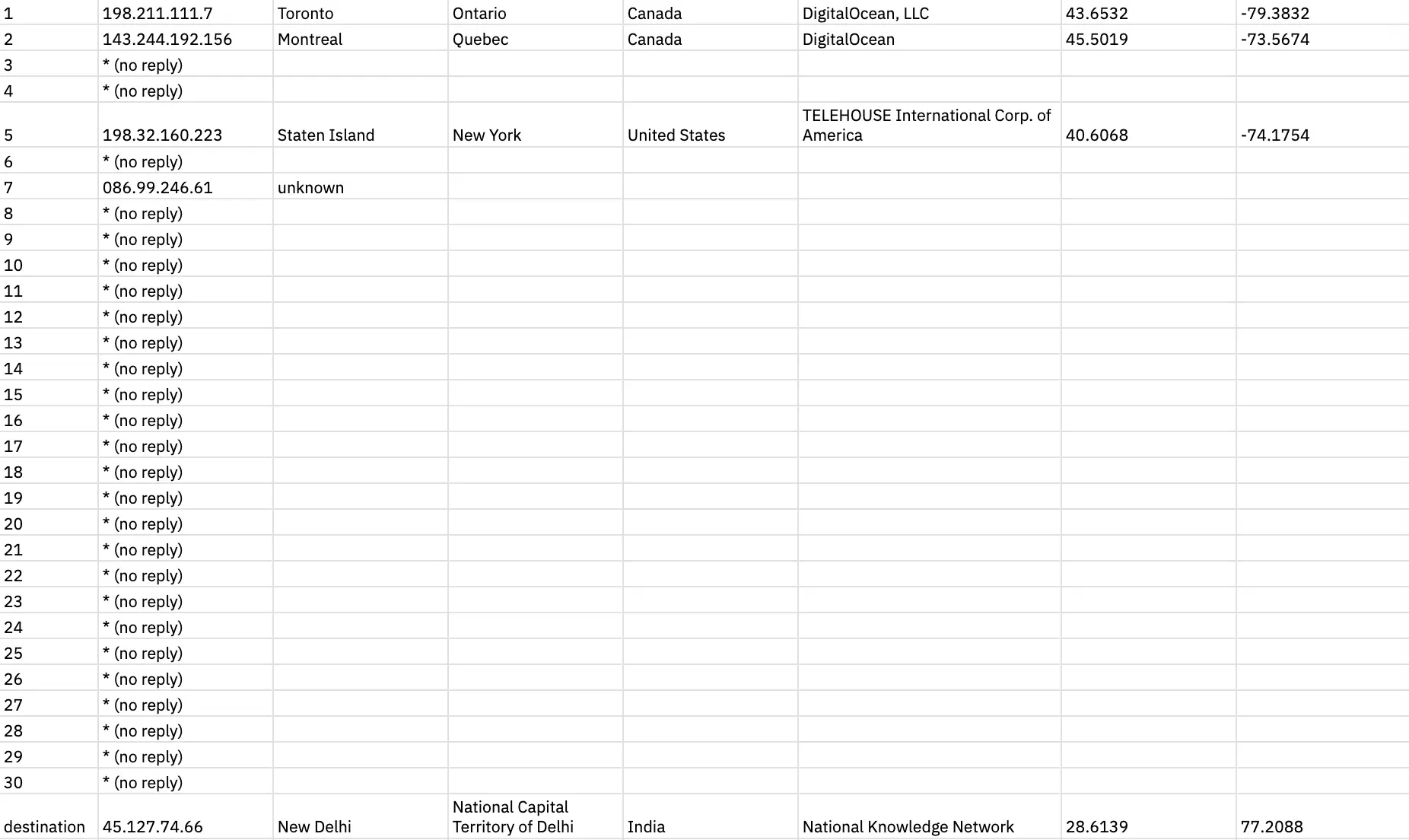
which is right inside the presidential compond:
so i did the same with the fbi (to see if they too were in the whitehouse somewhere?):
fbi’s traceroute was the fastest.
turns out fbi is more chill … their public site is served from canada:

maybe this doesn’t have sensitive data. so i found vault.fbi.gov (public database). that’s got to be somewhere safe? nope; served from the same.
then i looked for the crime data explorer. finally found their isp. they have a whole separate one for criminal justice, and it’s in west virginia.
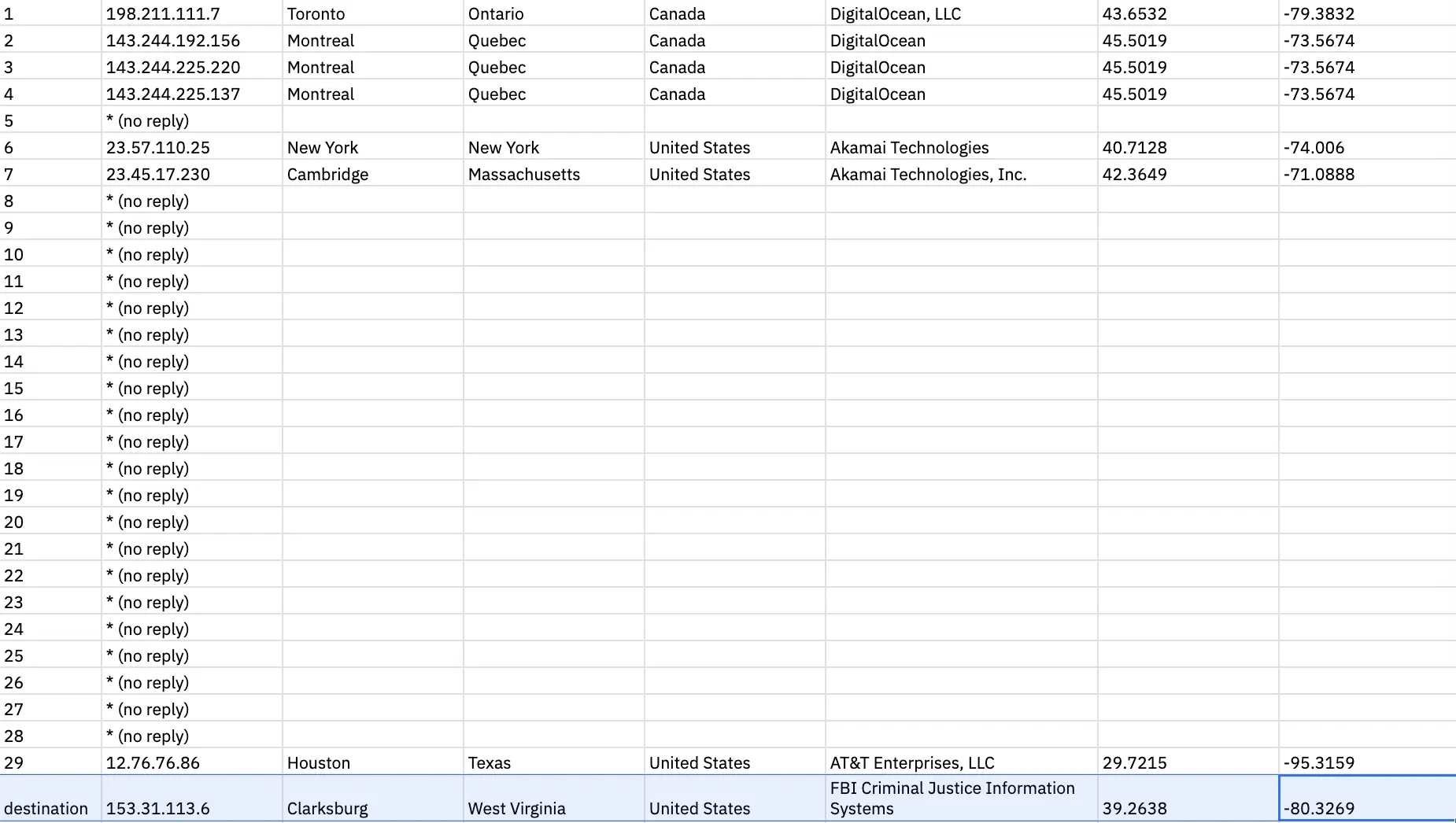
all finds are here on this spreadsheet:
i also discovered something else, and flagged it to a friend. when i looked up their domain registration, their address, name & phone number were all visible! they’re very careful with their privacy; so discovering this was a shocker. i wonder how this happened.
and, there’s very little to discover about the fbi destination server:
non-root@arjunnon-ronon-root@arjun-und-net:~$ whois 153.31.113.6
% [whois.apnic.net]
% Whois data copyright terms    http://www.apnic.net/db/dbcopyright.html

% Information related to '153.0.0.0 - 153.255.255.255'

% Abuse contact for '153.0.0.0 - 153.255.255.255' is 'helpdesk@apnic.net'

inetnum:        153.0.0.0 - 153.255.255.255
netname:        ERX-NETBLOCK
descr:          Early registration addresses
country:        AU
admin-c:        IANA1-AP
tech-c:         IANA1-AP
abuse-c:        AA1452-AP
status:         ALLOCATED PORTABLE
remarks:        ------------------------------------------------------
remarks:        Important:
remarks:
remarks:        Networks in this range were allocated by InterNIC
remarks:        prior to the formation of Regional Internet
remarks:        Registries (RIRs): AfriNIC, APNIC, ARIN, LACNIC and RIPE NCC.
remarks:
remarks:        Address ranges from this historical space have now
remarks:        been transferred to the appropriate RIR database.remarks:
remarks:        If your search has returned this record, it means the
remarks:        address range is not administered by APNIC.
remarks:
remarks:        Instead, please search one of the following databases:
remarks:
remarks:        - AfriNIC (Africa)
remarks:        website: http://www.afrinic.net/
remarks:        command line: whois.afrinic.net
remarks:
remarks:        - ARIN (Northern America)
remarks:        website: http://www.arin.net/
remarks:        command line: whois.arin.net
remarks:
remarks:        - LACNIC (Latin America and the Carribean)
remarks:        website: http://www.lacnic.net/
remarks:        command line: whois.lacnic.net
remarks:
remarks:        - RIPE NCC (Europe)
remarks:        website: http://www.ripe.net/
remarks:        command line: whois.ripe.net
remarks:
remarks:        For information on the Early Registration Transfer
remarks:        (ERX) project, see:
remarks:
remarks:        http://www.apnic.net/db/erx
remarks:
remarks:        ------------------------------------------------------
mnt-by:         APNIC-HM
mnt-lower:      APNIC-HM
mnt-irt:        IRT-APNIC-AP
last-modified:  2026-07-09T08:00:22Z
source:         APNIC

irt:            IRT-APNIC-AP
address:        Brisbane, Australia
e-mail:         helpdesk@apnic.net
abuse-mailbox:  helpdesk@apnic.net
admin-c:        HM20-AP
tech-c:         NO4-AP
remarks:        APNIC is a Regional Internet Registry.
remarks:        We do not operate the referring network and
remarks:        are unable to investigate complaints of network abuse.
remarks:        For information about IRT, see www.apnic.net/irt
remarks:        helpdesk@apnic.net was validated on 2020-02-03
auth:           # Filtered
mnt-by:         APNIC-HM
last-modified:  2025-11-18T00:26:21Z
source:         APNIC

role:           ABUSE APNICAP
country:        ZZ
address:        Brisbane, Australia
phone:          +000000000
e-mail:         helpdesk@apnic.net
admin-c:        HM20-AP
tech-c:         NO4-AP
nic-hdl:        AA1452-AP
remarks:        Generated from irt object IRT-APNIC-AP
remarks:        helpdesk@apnic.net was validated on 2020-02-03
abuse-mailbox:  helpdesk@apnic.net
mnt-by:         APNIC-ABUSE
last-modified:  2025-11-28T01:00:58Z
source:         APNIC

role:           Internet Assigned Numbers Authority
address:        see http://www.iana.org.
admin-c:        IANA1-AP
tech-c:         IANA1-AP
nic-hdl:        IANA1-AP
remarks:        For more information on IANA services
remarks:        go to IANA web site at http://www.iana.org.
mnt-by:         MAINT-APNIC-AP
last-modified:  2018-06-22T22:34:30Z
source:         APNIC

% This query was served by the APNIC Whois Service version 1.88.48 (WHOIS-US2)
non-root@arjun-und-net:~$ dig @8.8.8.8 153.31.113.6

; <<>> DiG 9.18.39-0ubuntu0.24.04.7-Ubuntu <<>> @8.8.8.8 153.31.113.6
; (1 server found)
;; global options: +cmd
;; Got answer:
;; ->>HEADER<<- opcode: QUERY, status: NXDOMAIN, id: 50943
;; flags: qr rd ra ad; QUERY: 1, ANSWER: 0, AUTHORITY: 1, ADDITIONAL: 1

;; OPT PSEUDOSECTION:
; EDNS: version: 0, flags:; udp: 512
;; QUESTION SECTION:
;153.31.113.6.			IN	A

;; AUTHORITY SECTION:
.			86398	IN	SOA	a.root-servers.net. nstld.verisign-grs.com. 2026092001 1800 900 604800 86400

;; Query time: 10 msec
;; SERVER: 8.8.8.8#53(8.8.8.8) (UDP)
;; WHEN: Mon Sep 21 01:08:34 EDT 2026
;; MSG SIZE  rcvd: 116
i wonder why that is (although it reflects the power dynamic). how can someone be allowed to own a domain, while the rest of us have to rent it?
nyu’s domain expires in 2027:
Domain record activated:    08-Oct-1986
Domain record last updated: 24-Jun-2026
Domain expires:             31-Jul-2027
what happens if someone else buys it on 31st …