ask:
Create a reactive 3D mesh.
Use p5.js and WebGL.
Use the version of vertex() that includes the z parameter.
Use both position and color attributes.
Make your mesh react to user input. This can be using the mouse, keyboard, microphone, or any other input you can think of.
thought:
every enclosed body is a mesh, with vertices inside. shape is affected by the topology.
an enclosed body can be thought of as a group of similar colours.
output:
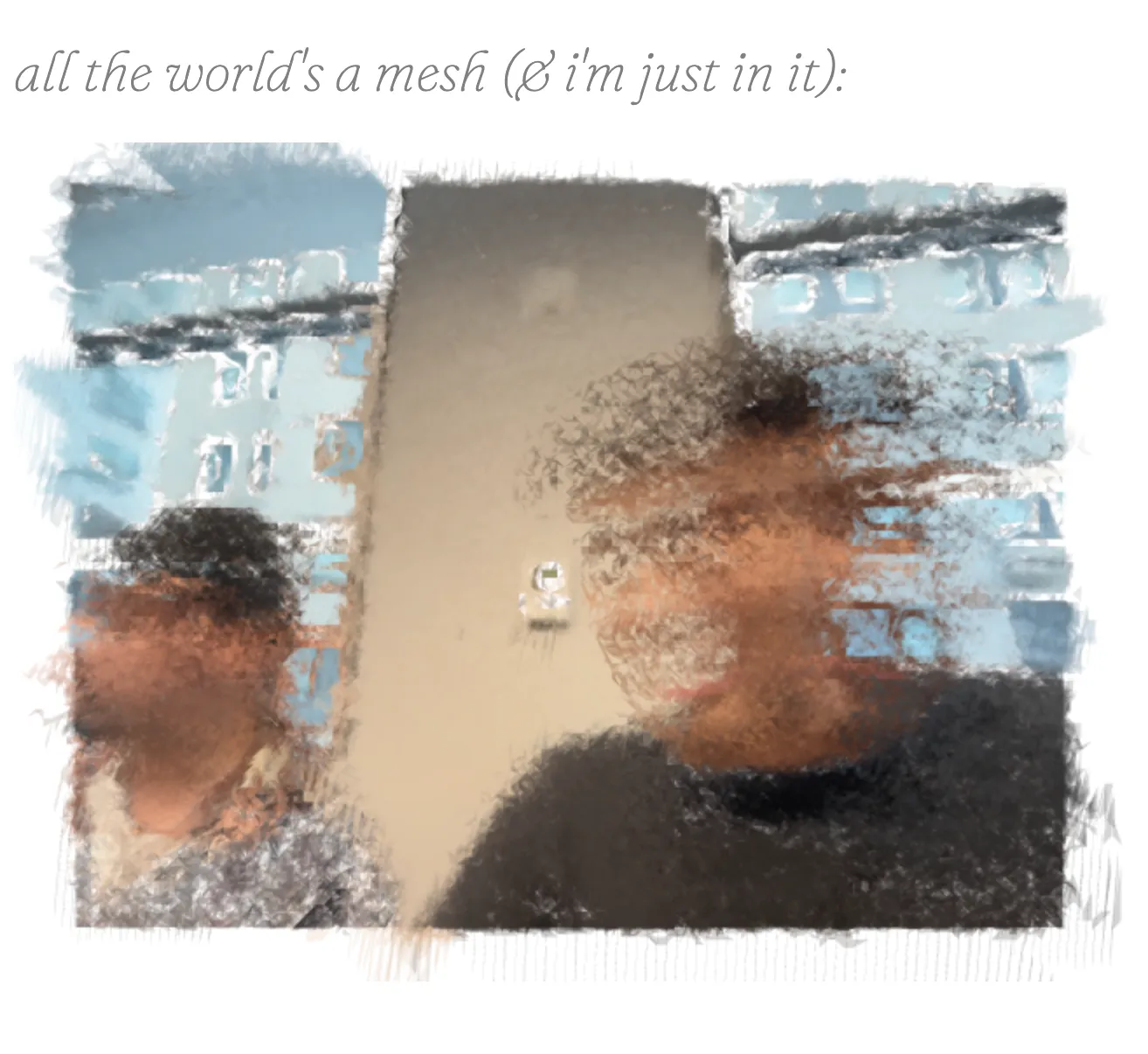
i tried programming something very complex, and it got too complicated.
//untitled; arjun; jan, 2026.

/*
ask:
make a reactive mesh, with vertices that use the z-parameter. use position & colour.
*/

/*
thought:
every enclosed body is a mesh, with vertices inside. shape is affected by the topology.

an enclosed body can be thought of as a group of similar colours.
*/

let cam;

let vertices = [];

let col_similarity_threshold = 50;

function setup() {
  cam = createCapture(VIDEO, canv_to_asp);
  cam.hide();
}

//helper to convert canvas to aspect ratio. runs once.
function canv_to_asp() {
  let asp_ratio = cam.height / cam.width;

  let wh = windowWidth * asp_ratio;

  createCanvas(windowWidth, wh, WEBGL);
}

function draw() {
  background(0);
  push();
  //first flip
  scale(-1, 1);
  translate(-width, 0);

  translate(width / 2, -height / 2); //bring back to the center.

  assign_vertices();

  image(cam, 0, 0, width, height);
  pop();
}

let groups = [];

function assign_vertices() {
  cam.loadPixels();
  //now we get a cam.pixels array with rgba values for each pixel.

  /*
  algorithm:
  - we go through every single x, y position on the screen.
  - for each pixel, look at its neighbours (8).
  - if the colour of the neighbour is similar (under a certain threshold), accumulate them into an object.
  - if the neighbour has been accumulated, don't look at it again.
  */

  for (let x = 0; x < cam.width; x++) {
    for (let y = 0; y < cam.height; y++) {
      //we go through every single pixel.
      let n = get_pixel_index(x, y);

      //find neighbours in the pixel array:
      let neighbours = get_neighbours(x, y);

      //the above returns index values in cam.pixels array with neighbours.

      // for each neighbour, see if the rgba is under the threshold. if so, accumulate them into a group.
      for (let i = 0; i < neighbours.length; i++) {
        let ni = neighbours[i];

        // red
        if (cam.pixels[ni] < cam.pixels[n] - col_similarity_threshold) continue;
        if (cam.pixels[ni] > cam.pixels[n] + col_similarity_threshold) continue;

        // green
        if (cam.pixels[ni + 1] < cam.pixels[n + 1] - col_similarity_threshold) continue;
        if (cam.pixels[ni + 1] > cam.pixels[n + 1] + col_similarity_threshold) continue;

        // blue
        if (cam.pixels[ni + 2] < cam.pixels[n + 2] - col_similarity_threshold) continue;
        if (cam.pixels[ni + 2] > cam.pixels[n + 2] + col_similarity_threshold) continue;

        // neighbour is similar
        groups.push(ni);
      }
    }
  }
}

//helper to convert x,y coordinates to pixels index.
function get_pixel_index(x, y) {
  return (y * cam.width + x) * 4;
}

function get_neighbours(x, y) {
  let neighbours = [];
  const possible_neighbours = [
    [x - 1, y - 1], // top-left
    [x, y - 1], // top
    [x + 1, y - 1], // top-right

    [x - 1, y], // left
    [x + 1, y], // right

    [x - 1, y + 1], // bottom-left
    [x, y + 1], // bottom
    [x + 1, y + 1], // bottom-right
  ];

  for (const [dx, dy] of possible_neighbours) {
    if (dx >= 0 && dx < cam.width && dy >= 0 && dy < cam.height) {
      neighbours.push(get_pixel_index(dx, dy));
    }
  }

  return neighbours;
}
i decided to break it down into smaller chunks.
when i did that, i realized that the computer was not able to convert all of the pixels and then render them as vertices.
i tried a bunch of approaches that failed. the algorithm was too complex for me to work out.
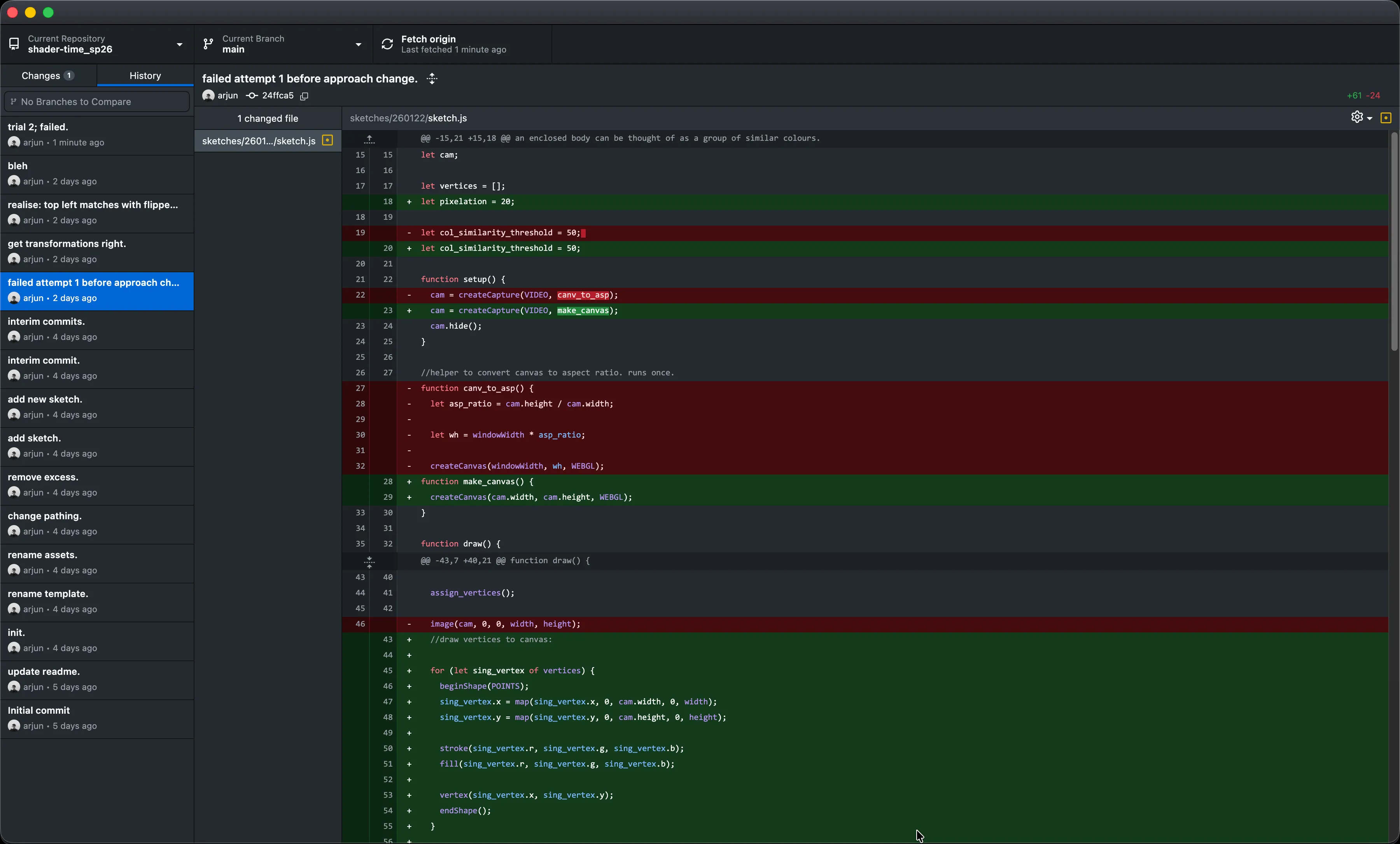
then i did some gpt stuff which got it working, but i didn’t understand what the hell was going on. i tried asking it to explain me, but i didn’t get it.
so i decided to write it from scratch.
learnt about using abs for comparison.
// we use abs to get rid of writing if > and if <. abs maps it to a number line.
        if (abs(neighbour_hue - studied_hue) < similarity_threshold) {
made this:
//untitled; arjun; month, 2026.

/*
ask:
make a reactive mesh, with vertices that use the z-parameter. use position & colour.
*/

/*
thought:

*/

let cam;

let pixelation = 3;

let similarity_threshold = 10;

function setup() {
  cam = createCapture(VIDEO, { flipped: true }, make_canvas);
  pixelDensity(1);
  cam.hide();
}

//make canvas the same size as camera for easier calculations.
function make_canvas() {
  createCanvas(cam.width, cam.height, WEBGL);
}

function draw() {
    background(0);

  //   push();
  //   translate(-width / 2, -height / 2);
  //   //webgl renders canvas from the center of the screen; so.
  //   image(cam, 0, 0, width, height);
  //   pop();

  if (frameCount % 1 == 0) {
    make_groups();
  }

  draw_groups();
}

//this function will read all colour values, cluster similar colours together into a group.

// we keep two variables:
let groups = []; //stores data in the format: groups[id][indices], where id increments sequentially, and indices is a list of all cam.pixels indices that belong to the group.

let pixel_to_group; //this stores data in this format: studied_index: groupid. we use this to check if the pixel being studied has been grouped or not.

function make_groups() {
  cam.loadPixels();
  //^ returns a cam.pixels array with rgba information.

  // reset every frame
  groups = [];
  pixel_to_group = {};

  // go through every single pixel and compare its colour value with its neighbour.
  for (let x = 0; x < cam.width; x += pixelation) {
    for (let y = 0; y < cam.height; y += pixelation) {
      // this is the studied pixel. we get its values first.
      let studied_index = get_pixel_index(x, y);

      let studied_rgba = color(cam.pixels[studied_index], cam.pixels[studied_index + 1], cam.pixels[studied_index + 2], cam.pixels[studied_index + 3]);

      let studied_hue = Math.floor(hue(studied_rgba));

      // now we have the hue of the pixel being looked at. we now want to compare it to its neighbours.
      let neighbours = get_neighbours(x, y);
      // ^ returns an array of indices for cam.pixels.

      // this will store the group id if we find a matching neighbour.
      let found_group = null;

      // now we compare the studied hue to neighbour_hue.
      for (let i = 0; i < neighbours.length; i++) {
        let neighbour_index = neighbours[i];

        // we see if the neighbour has been grouped before. if not, we skip through this neighbour business, so that the current pixel can get its own group.
        if (pixel_to_group[neighbour_index] === undefined) {
          continue;
        }

        // a group near the neighbour being studied exists, which means we can group it to that group.

        //get its colour. we compare hue.
        let neighbour_rgba = color(cam.pixels[neighbour_index], cam.pixels[neighbour_index + 1], cam.pixels[neighbour_index + 2], cam.pixels[neighbour_index + 3]);
        let neighbour_hue = Math.floor(hue(neighbour_rgba));

        // we use abs to get rid of writing if > and if <. abs maps it to a number line.
        if (abs(neighbour_hue - studied_hue) < similarity_threshold) {
          // this is a valid colour to be grouped.
          found_group = pixel_to_group[neighbour_index];
          break;
        }
      }

      // if no neighbour matched, create a new group
      if (found_group === null) {
        let new_group_id = groups.length;
        groups.push([studied_index]);
        pixel_to_group[studied_index] = new_group_id;
      }
      // otherwise, add this pixel to an existing group, if found.
      else {
        groups[found_group].push(studied_index);
        pixel_to_group[studied_index] = found_group;
      }
    }
  }
}

//this one tries to take some dynamic decisions to make either a triangle or triangle strip topology.
// function draw_groups() {
//   push();

//   // since webgl draws from the center of the screen:
//   translate(-width / 2, -height / 2);

//   colorMode(RGB, 255);
//   noFill();

//   // we want to draw a mesh for every single group.
//   for (let n = 0; n < groups.length; n++) {
//     if (groups[n].length < 3) continue; //skip these groups, because they're too small to be a mesh.

//     // now we decide the topology.

//     //if it is divisible by 3, we form a triangle-strip.
//     if (groups[n].length % 3 === 0) {
//       beginShape(TRIANGLES);

//       for (let i = 0; i < groups[n].length; i++) {
//         let index = groups[n][i];
//         let { x, y } = index_to_xy(index);

//         // z keeps shifting.

//         let r = cam.pixels[index];
//         let g = cam.pixels[index + 1];
//         let b = cam.pixels[index + 2];

//         let osci = sin(frameCount * 0.05);

//         const z_depth = width;

//         let t = frameCount * 0.0005;
//         let z = map(noise(i * 0.1, t), 0, 1, 0, z_depth);

//         // stroke(r, g, b);
//         // strokeWeight(pixelation);
//         // point(x, y, 1);

//         noStroke();
//         fill (r,g,b);
//         vertex(x, y, z);
//       }

//       endShape();
//     } else {
//       beginShape(TRIANGLE_STRIP);

//       for (let i = 0; i < groups[n].length; i++) {
//         let index = groups[n][i];
//         let { x, y } = index_to_xy(index);

//         let r = cam.pixels[index];
//         let g = cam.pixels[index + 1];
//         let b = cam.pixels[index + 2];

//         const z_depth = width;

//         let t = frameCount * 0.0005;
//         let z = map(noise(i * 0.01, t), 0, 1, 0, z_depth);

//         noStroke();
//         fill(r, g, b);
//         vertex(x, y, z);
//       }

//       endShape();
//     }
//   }

//   pop();
// }

function draw_groups() {
  push();
  // since webgl draws from the center of the screen:
  translate(-width / 2, -height / 2);
  colorMode(RGB, 255);
  noFill();
  // we want to draw a mesh for every single group.
  for (let n = 0; n < groups.length; n++) {
    if (groups[n].length < 4) continue; //skip these groups, because they're too small to be a mesh.
    beginShape(QUAD_STRIP);
    for (let i = 0; i < groups[n].length; i++) {
      let index = groups[n][i];
      let { x, y } = index_to_xy(index);
      // z keeps shifting.
      let r = cam.pixels[index];
      let g = cam.pixels[index + 1];
      let b = cam.pixels[index + 2];
      let osci = sin(frameCount * 0.05);
      const z_depth = width;
      let t = frameCount * 0.0005;
      let z = map(noise(i * 0.1, t), 0, 1, 0, z_depth);
      // stroke(r, g, b);
      // strokeWeight(pixelation);
      // point(x, y, 1);
      noStroke();
      fill(r, g, b);
      vertex(x, y, z);
    }
    endShape();
  }
}

/* helpers: */

//helper written by an llm to fetch neighbours for a given pixel, taking in mind the pixelation value.
function get_neighbours(x, y) {
  let neighbours = [];

  // Check all 8 surrounding positions (or fewer at edges)
  for (let dx = -pixelation; dx <= pixelation; dx += pixelation) {
    for (let dy = -pixelation; dy <= pixelation; dy += pixelation) {
      // Skip the center pixel itself
      if (dx === 0 && dy === 0) continue;

      let nx = x + dx;
      let ny = y + dy;

      // Check bounds
      if (nx >= 0 && nx < cam.width && ny >= 0 && ny < cam.height) {
        let index = get_pixel_index(nx, ny);
        neighbours.push(index); // just return the index of the neighbours.
        //     {
        //   x: nx,
        //   y: ny,
        //   index: index,
        //   color: {
        //     r: cam.pixels[index],
        //     g: cam.pixels[index + 1],
        //     b: cam.pixels[index + 2],
        //     a: cam.pixels[index + 3],
        //   },
        // });
      }
    }
  }

  return neighbours;
}

//helper to convert x,y coordinates to pixels index.
function get_pixel_index(x, y) {
  return (y * cam.width + x) * 4;
}

//helper to convert index to coordinates.
function index_to_xy(index) {
  let p = index / 4;
  let x = p % cam.width;
  let y = Math.floor(p / cam.width);
  return { x, y };
}

function mousePressed() {
  noLoop();
}
my algorithm works decently, because it chunks vertices together.
achieved a cool gouache sort of sketch.
//untitled; arjun; month, 2026.

/*
ask:
make a reactive mesh, with vertices that use the z-parameter. use position & colour.
*/

/*
thought:

*/

let cam;

let pixelation = 5;

let similarity_threshold = 1;

function setup() {
  cam = createCapture(VIDEO, { flipped: true }, make_canvas);
  pixelDensity(1);
  cam.hide();
}

//make canvas the same size as camera for easier calculations.
function make_canvas() {
  createCanvas(cam.width, cam.height, WEBGL);
}

function draw() {
    // background (255);

  //for testing video feed.
    push();
    translate(-width / 2, -height / 2);
    //webgl renders canvas from the center of the screen; so.

    // tint (100, 50);
    // image(cam, 0, 0, width, height);
    pop();

  if (frameCount % 1 == 0) {
    make_groups();
  }
  tint(255, 255);
  draw_groups();
}

//this function will read all colour values, cluster similar colours together into a group.

// we keep two variables:
let groups = []; //stores data in the format: groups[id][indices], where id increments sequentially, and indices is a list of all cam.pixels indices that belong to the group.

let pixel_to_group; //this stores data in this format: studied_index: groupid. we use this to check if the pixel being studied has been grouped or not.

function make_groups() {
  cam.loadPixels();
  //^ returns a cam.pixels array with rgba information.

  // reset every frame
  groups = [];
  pixel_to_group = {};

  // go through every single pixel and compare its colour value with its neighbour.
  for (let x = 0; x < cam.width; x += pixelation) {
    for (let y = 0; y < cam.height; y += pixelation) {
      // this is the studied pixel. we get its values first.
      let studied_index = get_pixel_index(x, y);

      let studied_rgba = color(cam.pixels[studied_index], cam.pixels[studied_index + 1], cam.pixels[studied_index + 2], cam.pixels[studied_index + 3]);

      let studied_hue = Math.floor(hue(studied_rgba));

      // now we have the hue of the pixel being looked at. we now want to compare it to its neighbours.
      let neighbours = get_neighbours(x, y);
      // ^ returns an array of indices for cam.pixels.

      // this will store the group id if we find a matching neighbour.
      let found_group = null;

      // now we compare the studied hue to neighbour_hue.
      for (let i = 0; i < neighbours.length; i++) {
        let neighbour_index = neighbours[i];

        // we see if the neighbour has been grouped before. if not, we skip through this neighbour business, so that the current pixel can get its own group.
        if (pixel_to_group[neighbour_index] === undefined) {
          continue;
        }

        // a group near the neighbour being studied exists, which means we can group it to that group.

        //get its colour. we compare hue.
        let neighbour_rgba = color(cam.pixels[neighbour_index], cam.pixels[neighbour_index + 1], cam.pixels[neighbour_index + 2], cam.pixels[neighbour_index + 3]);
        let neighbour_hue = Math.floor(hue(neighbour_rgba));

        // we use abs to get rid of writing if > and if <. abs maps it to a number line.
        if (abs(neighbour_hue - studied_hue) < similarity_threshold) {
          // this is a valid colour to be grouped.
          found_group = pixel_to_group[neighbour_index];
          break;
        }
      }

      // if no neighbour matched, create a new group
      if (found_group === null) {
        let new_group_id = groups.length;
        groups.push([studied_index]);
        pixel_to_group[studied_index] = new_group_id;
      }
      // otherwise, add this pixel to an existing group, if found.
      else {
        groups[found_group].push(studied_index);
        pixel_to_group[studied_index] = found_group;
      }
    }
  }
}

//this one tries to take some dynamic decisions to make either a triangle or triangle strip topology.
function draw_groups() {
  push();

  // since webgl draws from the center of the screen:
  translate(-width / 2, -height / 2);

  //coloring stuff; remains global across meshes:
  colorMode(RGB, 255);
  noStroke();

  // we want to draw a mesh for every single group.
  for (let n = 0; n < groups.length; n++) {
    if (groups[n].length < 3) continue; //skip these groups, because they're too small to be a mesh.

    // z transformations:
    let max_group_length = Math.max(...groups.map((g) => g.length));
    const max_z_depth = 50;
    const min_z_depth = -50;

    // now we decide the topology.

    //if it is divisible by 3, we form a triangle-strip.
    if (groups[n].length % 3 === 0) {
      push();
      let z = map(groups[n].length, 3, max_group_length, min_z_depth, max_z_depth);
      translate(0, 0, z);
      beginShape(TRIANGLES);

      for (let i = 0; i < groups[n].length; i++) {
        let index = groups[n][i];
        let { x, y } = index_to_xy(index);

        let r = cam.pixels[index];
        let g = cam.pixels[index + 1];
        let b = cam.pixels[index + 2];

        stroke (r,g,b,255);
        strokeWeight (20);
        fill(r, g, b, 50);

        vertex(x, y, 0);
      }

      endShape();

      pop();
    } else {
      push();
      let z = map(groups[n].length, 0, max_group_length, min_z_depth, max_z_depth);
      translate(0, 0, z);
      beginShape(TRIANGLE_STRIP);

      for (let i = 0; i < groups[n].length; i++) {
        let index = groups[n][i];
        let { x, y } = index_to_xy(index);

        let r = cam.pixels[index];
        let g = cam.pixels[index + 1];
        let b = cam.pixels[index + 2];

        let z = map(n, 0, max_group_length, min_z_depth, max_z_depth);

        stroke(r, g, b, 255);
        strokeWeight(20);
        fill(r, g, b, 50);

        vertex(x, y, 0);
      }

      endShape();
      pop();
    }
  }

  pop();
}

// // this one just draws triangle-strip meshes.
// function draw_groups() {
//   push();
//   // since webgl draws from the center of the screen:
//   translate(-width / 2, -height / 2);
//   colorMode(RGB, 255);
//   noFill();
//   // we want to draw a mesh for every single group.
//   for (let n = 0; n < groups.length; n++) {
//     if (groups[n].length < 4) continue; //skip these groups, because they're too small to be a mesh.
//     beginShape(TRIANGLE_STRIP);
//     for (let i = 0; i < groups[n].length; i++) {
//       let index = groups[n][i];
//       let { x, y } = index_to_xy(index);
//       let r = cam.pixels[index];
//       let g = cam.pixels[index + 1];
//       let b = cam.pixels[index + 2];

//       let z = 0;

//       // stroke(r, g, b);
//       // strokeWeight(pixelation);
//       // point(x, y, 1);
//       noStroke();
//       fill(r, g, b);
//       vertex(x, y, z);
//     }
//     endShape();
//   }
// }

/* helpers: */

//helper written by an llm to fetch neighbours for a given pixel, taking in mind the pixelation value.
function get_neighbours(x, y) {
  let neighbours = [];

  // Check all 8 surrounding positions (or fewer at edges)
  for (let dx = -pixelation; dx <= pixelation; dx += pixelation) {
    for (let dy = -pixelation; dy <= pixelation; dy += pixelation) {
      // Skip the center pixel itself
      if (dx === 0 && dy === 0) continue;

      let nx = x + dx;
      let ny = y + dy;

      // Check bounds
      if (nx >= 0 && nx < cam.width && ny >= 0 && ny < cam.height) {
        let index = get_pixel_index(nx, ny);
        neighbours.push(index); // just return the index of the neighbours.
      }
    }
  }

  return neighbours;
}

//helper to convert x,y coordinates to pixels index.
function get_pixel_index(x, y) {
  return (y * cam.width + x) * 4;
}

//helper to convert index to coordinates.
function index_to_xy(index) {
  let p = index / 4;
  let x = p % cam.width;
  let y = Math.floor(p / cam.width);
  return { x, y };
}

//for debugging:
// function mousePressed() {
//   noLoop();
// }