ask:
For this assignment, either expand on what you created in class this week using inverse kinematics and the Javascript implementation of the noise function, or do something different with them.
As usual, have fun with it, and see how creative you can be. With the tools that you have now, you should be able to create people or creatures that exhibit compelling and lifelike movement.
Some challenges you might want to take on:
• See if you can have a character reach out and pick up (and/or put down) an object, using the IK to attach the hand and the object at the right moment, while maintaining lifelike movement of the character’s body. To help create the appearance of lifelike movement, you might want to try adding noise into joint rotations.
• See if you can create a walking character whose feet (or paws or hooves) do not slide when they are in contact with the ground. For example, you might want everything from the hips up to move in a continuous path, while using IK to carefully animate the feet.
A note about assignments 7a and 8a: If you wish, you can also post the results of what you created during class. Doing that, even if the results are rough, can only help the grader to appreciate your work. :-)
i first improved my template to make the sketch fullscreen:
<!doctype html>
<html lang="en">
  <head>
    <meta charset="utf-8" />
    <meta name="viewport" content="width=device-width, initial-scale=1.0" />

    <title>sketch</title>
  </head>
  <body bgcolor="black">
    <!--<canvas id="canvas" width="800" height="800"></canvas>-->
    <canvas id="canvas"></canvas>

    <!-- for debug: -->
    <style>
      canvas {
        border: 1px solid white;
        margin: 0;
        padding: 0;
        width: 99vw;
        height: 99vh;
        overflow: hidden;
      }
    </style>

    <!-- scripts: -->
    <script src="../assets/webgl-3.1.js"></script>
    <script src="../assets/library-1.2.js"></script>
    <script src="../assets/shapes.js"></script>
    <script src="../assets/materials.js"></script>
    <script src="../assets/noise.js"></script>

    <!-- webgl: -->
    <script>
      let checker = true;
      function Scene() {

        //to make a scene now, we simply define a vertex map (where each thing is, and its size):
        this.vertex_size = 6;
        this.vertex_attributes = {
          a_pos: { size: 3, position: 0 },
          a_nor: { size: 3, position: 3 },
        };

        this.vertex_shader = `#version 300 es
        uniform mat4 u_mf, u_mi;
        in vec3 a_pos, a_nor;
        out vec3 v_pos, v_nor;

        void main(){
          vec4 pos = u_mf * vec4(a_pos, 1.);
          vec4 nor = vec4(a_nor, 0.) * u_mi;
          v_pos = pos.xyz / pos.w;
          v_pos.z *= -1.;
          v_nor = nor.xyz;
          gl_Position = vec4(v_pos, 1.);
        }`;

        this.fragment_shader = `#version 300 es
        precision highp float;

        in  vec3 v_pos, v_nor;
        out vec4 frag_col;

        uniform vec3 u_amb, u_diff;

        uniform vec4 u_spec;

        uniform float u_time;

        void main() {
        vec3 l_dir = normalize(vec3(-1., -1., 1.));
        vec3 n = normalize(v_nor);

        vec3 v = vec3(0., 0., 1.);

        float sim = dot (n, l_dir);
        vec3 ref = 2. * dot(n, l_dir) * n - l_dir;

        vec3 light = u_amb + u_diff * max (0., sim) + u_spec.rgb * pow(max(0., dot(ref, v)), u_spec.w);

        frag_col = vec4(sqrt(light), 1.);
        }`;

        //define variables:
        let start_time = Date.now() / 1000;
        let m = new Matrix();

        //define shapes to be used:
        let shp = make_sphere(50);

        this.update = () => {
          //resize to active canvas:
          canvas.width = canvas.clientWidth;
          canvas.height = canvas.clientHeight;
          gl.viewport(0, 0, canvas.width, canvas.height);

          let t = Date.now() / 1000 - start_time;
          set_uniform("1f", "u_time", t);

          //global transforms:
          m.identity();
          m.scale(canvas.height / canvas.width, 1, 1);
          m.perspective(10);

          m.scale(0.5);

          draw(shp, Material.red_plastic, m);
          };
      }

      gl_start(canvas, new Scene());

      //since i have frag in a different file:
      //let scene = new Scene();
      //fetch('./frag.frag').then(r => r.text()).then(src => {
      //  scene.fragment_shader = src;
      //  gl_start(canvas, scene);
      //});

    </script>

  </body>
</html>
my first realization was that it’s really tedious to draw this way, as compared to p5.
isometric rotation:
  m.rotate_x(Math.atan(1 / Math.sqrt(2)));
  m.rotate_y(Math.PI / 4);
moving a shape based on a dimension:
          //origin point:
          const w = 0.4;
          const h = 0.03;
          const d = h;

          const base_x = 0;

          m.move(base_x + w ,0., 0.);
          m.scale(w, h, d);

          draw(shp, Material.red_plastic, m);
single joinery:
          //origin point:
          const w = 0.2;
          const h = 0.03;
          const d = h;
          const base_x = -0.9;
          m.move(base_x + w ,0., 0.);

          m.push();
            m.scale(w, h, d);
            draw(shp, Material.red_plastic, m);
          m.pop();

          m.push();
            m.move(w*2, 0., 0.);
            m.scale(w,h,d);
            draw(shp, Material.blue_plastic, m);
          m.pop();
interesting effect:
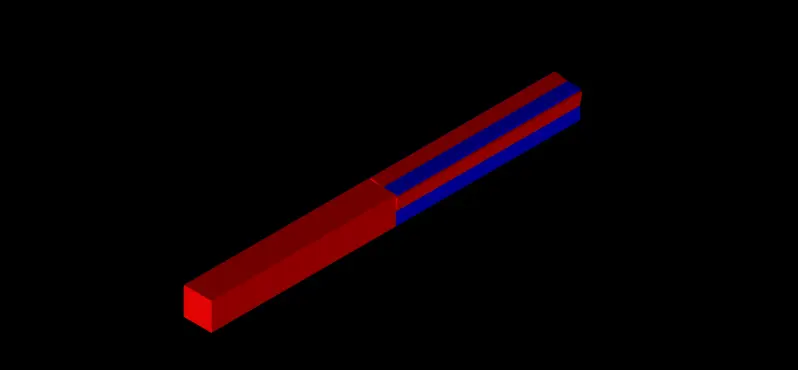
keep one cube static, and rotate the other one.